

Most hotel websites have no location pages at all. The ones that do usually have a single page listing ten attractions, loosely copied from a tourist board, ranking for nothing.
That’s an expensive gap. A traveller who has decided on your city but not your property is the largest audience in hotel search, and they’re searching for the area rather than for a place to sleep. Answering that search well is one of the clearest wins available in local SEO for hotels, and in hotel SEO generally.
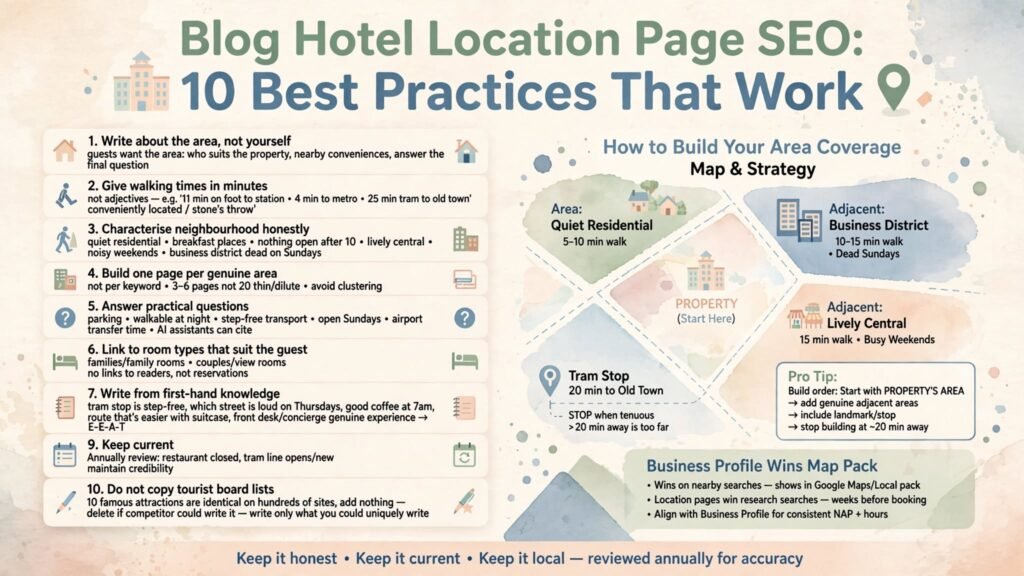
Here are the ten practices that separate a location page that brings bookings from one that just fills a sitemap.
Key takeaways
- Location pages reach the guest who has chosen the destination but not the property, the largest audience most hotels never reach.
- The page is about the area. Your property appears as the answer to the last question rather than as the subject.
- Specifics decide it: walking times in minutes, real transport connections, an honest picture of the neighbourhood.
- Build a few and build them properly. Four strong pages beat twenty thin ones, and thin area pages dilute the whole website.
- Every location page must link to the room types that suit the guest it attracts. Otherwise it gives you readers who never book.
1. Write about the area, not about yourself
The commonest failure. A page named after a neighbourhood that spends four paragraphs describing the hotel has answered the wrong question, and it ranks accordingly.
The guest wants to know what the area is like, what it’s near, who it suits and how to get around. Your property belongs at the end, as the natural answer to where they should stay once they’ve decided the area is right.
That restraint feels uncomfortable, and it’s what makes the page work.
2. Give walking times in minutes, not adjectives
Conveniently located, a stone’s throw, moments from the centre. None of these mean anything, and guests have learned not to trust them.
Replace every one with a number: eleven minutes on foot to the station, four minutes to the metro, twenty-five minutes by tram to the old town. If the walk involves a hill or stairs, say so, because a guest arriving with luggage is doing a practical calculation.
Accuracy here does double duty. It helps the page rank for “hotel near [landmark]” searches, and it prevents the review that says the hotel is further out than advertised.
3. Describe the neighbourhood honestly
Every area suits some guests and not others. A page that claims to suit everyone persuades nobody.
Say what the area is actually like. Quiet and residential, with excellent breakfast places and nothing open after ten. Lively, central and noisy at weekends. A business district, empty on Sundays. That honesty attracts the guest who wants exactly that and puts off the one who would have complained, which improves both conversion and reviews.
4. Build one page per real area, not per keyword
The temptation is to produce a page for every nearby landmark. Resist it.
Build a page where the area is clearly distinct and your property is clearly relevant to it. For most hotels that means three to six pages, not twenty. Thin area pages compete with each other and dilute the website, which makes it a clustering problem before it’s a content problem. Our guide to hotel keyword clustering covers how to make those decisions.
5. Answer the practical questions the search implies
Someone researching an area is planning logistics as much as experiences.
Cover parking, whether the area feels safe and walkable at night, step-free access to the main transport links, what’s open on Sundays and how long the airport transfer takes. These are the questions that decide where a guest stays, and almost no competing page answers them.
This practical detail is also what AI assistants quote most readily when a guest asks where to stay, because it’s specific and checkable.
6. Link to the room types that suit the guest
A location page that attracts families should link to the family rooms. One that attracts couples should link to the rooms with a view.
Without that link, the page produces readers who learned something about the area and left. With it, the page becomes the first step of a booking path, with a clear book-direct button for the guest who’s ready. The same logic works in reverse, so room pages should link back to the area pages. Our guide to hotel on-page SEO covers how those links should be wired.
7. Write from first-hand knowledge
The detail that makes these pages useful is the detail only your team has.
Which side entrance to use when the main street is closed for the Saturday market. Where the good coffee is at seven in the morning. Which route from the station is easier with a suitcase. Which beach is calmer for small children in the afternoon. A writer researching from a distance produces a page that reads plausibly and contains nothing a guest couldn’t have found elsewhere.
Get the substance from the front desk and the concierge, then have it written properly. That operational grounding is also what shows search engines real experience instead of merely claiming it.
8. Structure the page for scanning
Guests researching areas are comparing, not reading.
Use clear subheadings phrased as the guest’s questions, keep paragraphs short, and put the practical details where they can be found without hunting. A table of transport times earns its place. A wall of prose doesn’t.
The title tag should carry the area plus the city, such as “Staying in Alfama, Lisbon | [Hotel]”, because the guest is searching by place and may not know your name yet. Write the meta description to the question the guest is asking about the area.
Add Hotel schema with your full address and map coordinates, and embed a map. State the key distances in the text as well, because a map on its own can’t be read by search engines or AI assistants.
9. Keep them current
Area pages age badly and quietly. Transport routes change, restaurants close, building work starts, a new tram line opens.
Review them at least once a year, and straight away after any significant local change. An area page recommending a restaurant that closed two years ago undermines the credibility of everything else on the website, and guests notice it faster than you’d expect.
10. Don’t copy the tourist board
The lowest-value version of this page is a list of the ten most famous attractions in the city, available word for word on several hundred other websites.
It ranks for nothing because it adds nothing. If a paragraph on your page could appear unchanged on a competitor’s website, delete it and write something only you could have written.
How many to build, and in what order
Start with the area your property is actually in, since that’s the page with the clearest claim and the most direct relevance.
Add pages for the neighbouring areas where guests really consider staying, then for any landmark or district you’re close enough to matter for. Stop when the connection becomes a stretch, because a page claiming relevance to an area twenty minutes away convinces neither a guest nor a search engine.
For an independent property these pages are some of the most winnable ground available, because they depend on local knowledge rather than budget. Our guide to SEO for independent hotels covers why chains are structurally poor at this.
Where location pages fit alongside the Google Business Profile
Location pages work with your Google Business Profile, not instead of it. The profile wins the map pack and Google Maps results for nearby searches; location pages win the research searches that happen earlier, often weeks before the trip.
Both need to be right, and the profile moves faster, so it usually comes first. The profile layer of our hospitality SEO audit checklist goes through it field by field, and our guide to how hospitality SEO increases direct bookings shows where location pages sit in the guest’s path to a booking.
If you’d like to see which area searches your property appears for today, and which you’re missing, request a visibility audit of your property. Our video audit of Hotel Verdigris shows how we look at a hotel’s location content.
Frequently asked questions
How long should a hotel location page be?
Long enough to answer the practical questions properly, which is usually 600 to 900 words plus a map and a few good photos of the area. Padding beyond that adds nothing. A shorter page that gives exact walking times and honest detail will do better than a long one full of general description.
How many location pages should a hotel have?
Three to six for most properties: the area you’re in, the neighbouring areas guests compare, and the landmarks or districts you’re close to. Build where your relevance is real and stop when it becomes a stretch, because thin extra pages compete with the strong ones.
Should location pages mention nearby hotels?
No. Describe the area and let your property be the answer, rather than drawing attention to the alternatives. Mention restaurants, shops, transport and attractions instead, which is what the guest is researching and what makes the page useful enough to rank.
Can we reuse area content across several properties in a group?
Only the factual parts, and even then each page needs its own walking times, its own practical detail and its own room links. Copying area text across properties makes the pages compete with each other, and none of them ends up ranking as well as one unique page would.
Do location pages work for restaurants too?
Yes, though the emphasis shifts. Restaurant location pages focus on occasions and on proximity to landmarks, theatres, offices and venues, rather than on transport logistics. “Dinner near [theatre]” or “lunch near [office district]” pages can rank well and lead straight to reservations.
Should we add a map to the page?
Yes, and state the practical details in the text as well. An embedded map on its own can’t be read by search engines or AI assistants, so write out the walking times, transport links and landmarks too, and include your full address with schema markup.
How do we know if a location page is working?
Watch non-brand impressions and clicks for area searches in Search Console, and the click-through from the location page to your room pages and booking engine. The second number tells you whether the page is producing readers or guests. Give a new page three to six months before judging it.